
The Billable Hour Paradox: Why Traditional Legal Tech is Failing
In a landscape where time is money and precision is paramount, law firms can no longer afford the chaos of scattered tools and clunky workflows. While legacy systems still dominate the legal industry, an increasing number of forward-thinking firms are making a strategic pivot—toward Notion.
But here’s the kicker: Not all Notion setups are made equal.
A well-crafted Notion template for law firms isn’t just another productivity hack—it’s a competitive edge. It’s your all-in-one command center: CRM, case tracker, document repository, client intake, legal calendar, and more.
As the old proverb goes: “When the roots are deep, there is no reason to fear the wind.” In an industry where legal storms are frequent, the deep roots of an efficient, custom Notion system can provide stability, clarity, and control.
Notion as a “Legal OS”: Beyond Simple Note-Taking
Notion is a powerful all-in-one digital workspace where teams can write, plan, organize, and collaborate. Think of it as part Google Docs, part Trello, part Airtable—but infinitely more customizable.
The Fragmented Workflow: Solving the “Too Many Tabs” Problem
Before diving into templates, let’s get real about the tech landscape in most law firms:
- Fragmented tools (Word docs + spreadsheets + CRMs that don’t talk to each other)
- Time leakage due to poor task tracking
- Inconsistent client communication
- Zero visibility into team workload or project status
Sound familiar? Notion solves these problems—if implemented correctly.
7 Pillars of a High-Efficiency Legal Workspace
Let’s explore exactly how a purpose-built Notion template for law firms can bring order to the legal chaos.
1. The Central Matter Dashboard: Cases at a Glance
Ditch your spreadsheet jungle. Notion templates can integrate:
- Client profiles with dynamic properties
- Case timelines and court date reminders
- Case notes linked to relevant documentation
- Secure access control for team members
Imagine pulling up everything related to a client case—contracts, communications, tasks—in one click. That’s not a luxury; that’s a standard in 2026.
2. Deadline Defense: Automated Workflows & Docketing
With templates that support:
- Custom task pipelines (e.g., Intake → Discovery → Filing → Court Appearance)
- Priority flags, due dates, billable hours
- Assignments across paralegals, attorneys, and admins
You’re not just tracking work—you’re managing outcomes.
3. Automating Intake: From Prospect to Client in Zero Clicks
Using Notion’s new database buttons and public forms, firms can:
- Capture leads via custom Notion-powered intake forms
- Auto-sort them into your CRM pipeline
- Trigger onboarding tasks instantly
According to Notion’s 2024 update logs, public form capabilities reduced onboarding time by 43% on average for service-based firms.
🔗 Learn about Notion’s public form feature
4. The Digital File Room: Smart Linking & Evidence Tracking
Every lawyer has uttered, “Where’s that version of the doc?” at least once this week.
Notion templates enable:
- Nested folders with version history
- Linked references between cases and exhibits
- Quick search and tag filtering
5. The Firm Precedent Library: Stop Drafting from Scratch
Create a living database of:
- Precedent cases
- Legal research
- Draft clauses
The best firms we’ve worked with at Petereza.com treat their Notion workspace like an evolving legal library, complete with internal search, tag systems, and case-linked knowledge. This article explores how systematized knowledge sharing impacts business resilience.
6. Court Dates & Compliance: The Integrated Calendar
Sync your Notion template with Google Calendar to automate:
- Hearing dates
- Filing deadlines
- Staff availability
You can even generate custom calendar views by court type or jurisdiction.
7. Firm Financials: Tracking Revenue & Billable Utilization
A powerful feature often overlooked: real-time analytics. Measure what matters.
- Billable vs. non-billable hours
- Staff performance
- Case progress by stage
Dashboards built into your law firm’s Notion template give you insights before things go sideways.
Case Study: How a Solo Practitioner Scaled to a Firm Using Notion
One boutique law firm in New York switched from Clio to a custom Notion template designed by Petereza’s Notion system architects. Within three months:
- Client onboarding time was cut in half
- Missed deadlines dropped to zero
- Staff satisfaction soared (yes, really)
As one partner put it:
“We stopped managing chaos. We started managing strategy.”
The Security Question: Is Notion Safe for Attorney-Client Privilege?
Not all templates are created equal. Generic templates won’t account for:
- Your firm’s size and structure
- Practice areas (corporate vs. litigation)
- Jurisdictional nuances
That’s why Petereza offers tailored Notion systems for law firms, built from scratch or optimized from our best-performing frameworks.
Explore our Notion template catalog for law firms or reach out for a bespoke build.
Stop Building, Start Billing: The Professional Solution
In legal practice, credibility is currency. The same applies to the systems you rely on. Trust a team that speaks both law and Notion fluently.
“You don’t rise to the level of your goals. You fall to the level of your systems.” — James Clear
When you upgrade your systems, you upgrade your firm.
Upgrade Your Firm’s Operating System
You are not alone in juggling fragmented tools, but in a competitive legal market, outdated tech is a liability. Move beyond basic templates and adopt a dedicated digital headquarters.
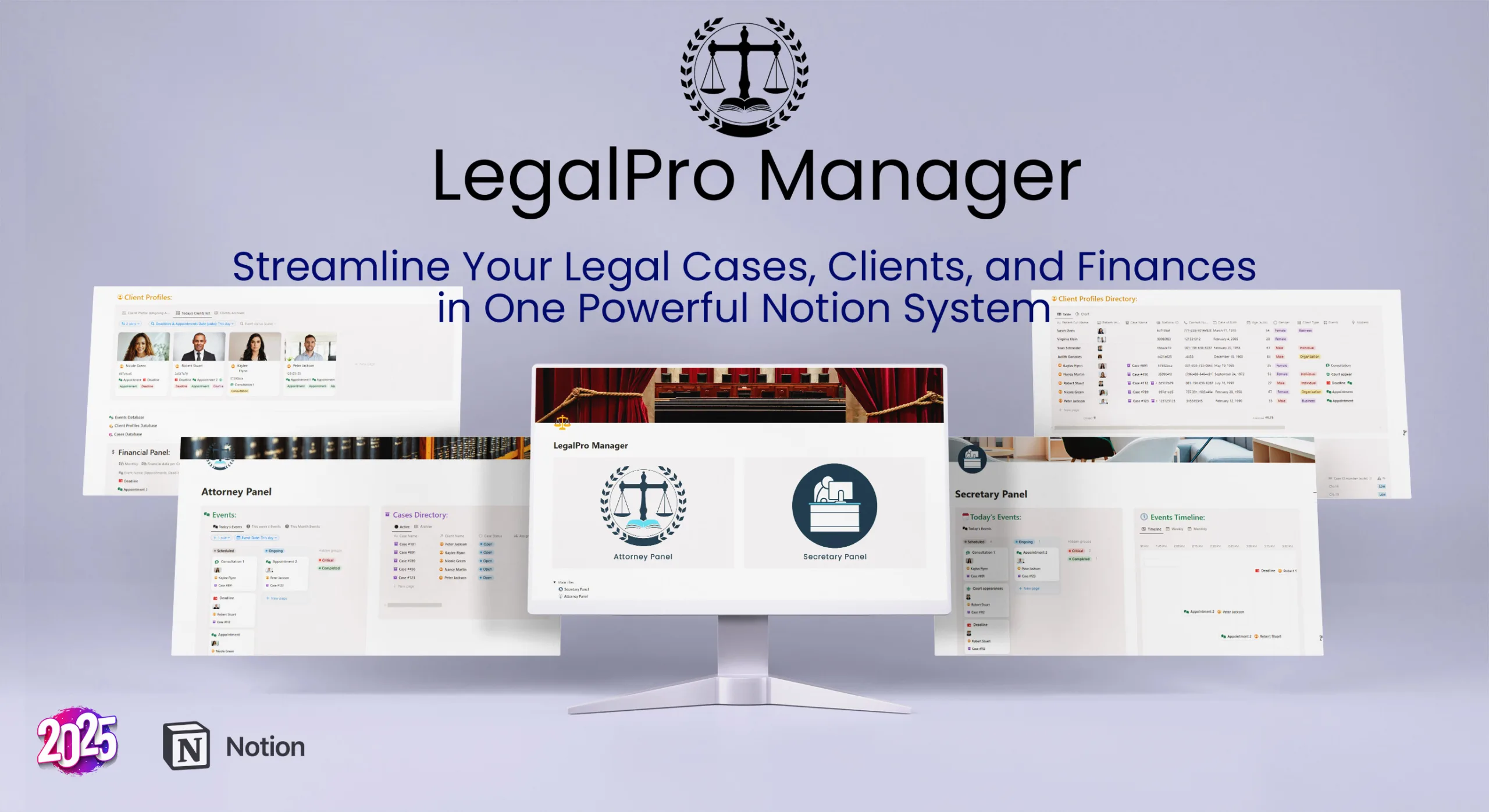
We developed LegalPro Manager to bridge the gap between expensive legal software and flexible Notion workflows
- 👉 Book a consultation – and we’ll help design your custom system
- 👉 View services for workflow automation, training, and long-term support